My Local LLM Setup - Fast Agentic Development with No Token Bill
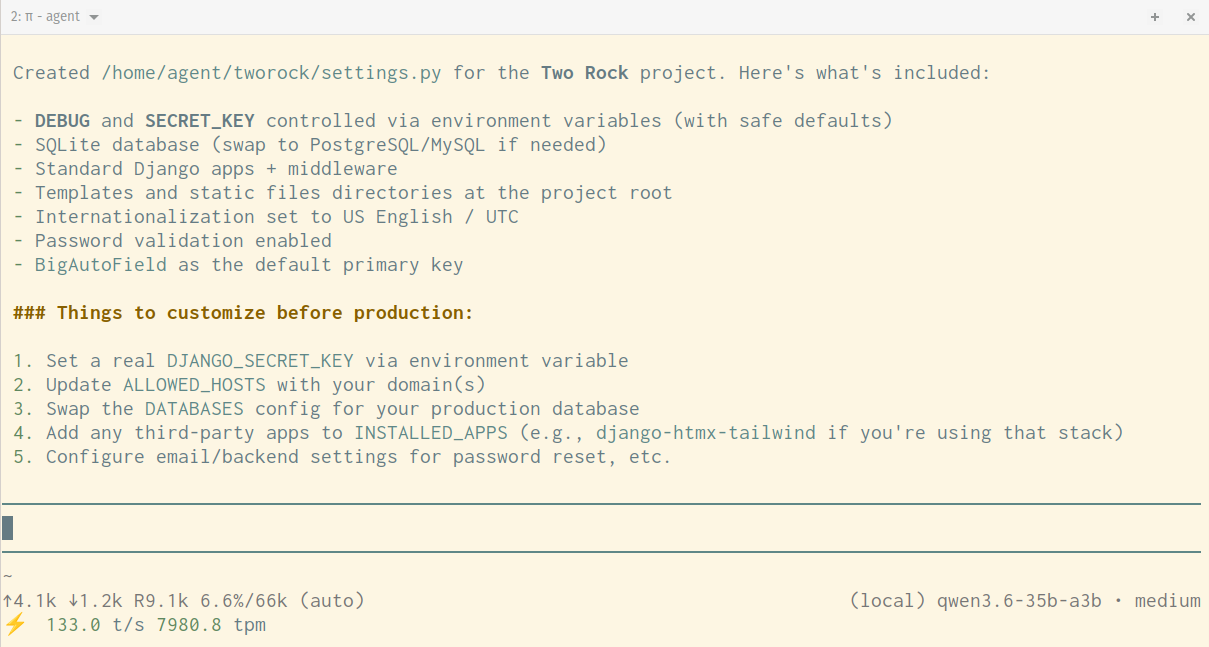
I get a lot of use out of my Claude subscription. But, I also like being able to do LLM-powered tasks without per-token pricing and sending all my data to the cloud. So, I've developed a local setup that is good enough for a great many tasks. It's not frontier level, but it easily competes with where the frontier models were maybe a year ago.
My primary computer has an Nvidia GeForce RTX 4090 video card with 24gb of VRAM. It runs Linux. If you also run Linux and have 24gb of VRAM, much of what I detail here can run as-is on your computer. If you have more or less VRAM, this post may be a useful starting point, but you'll want to use different quantizations of the models and tweak the settings a bit.
The Server
You need some software to load your model and make inference happen.
I serve my models with llama.cpp. I tried Ollama initially, but I found going direct to llama.cpp gives me easier access to the levers and knobs I want to adjust without putting anything in my way. Ollama is a good starting point if you want to get up and running fast to start experimenting.
Llama.cpp gets new releases constantly--whenever new code gets merged. I compile it for my computer specifically and try to remember to re-compile it every week or so. I keep a little build script in the folder where I have the project's source code checked out to make this easy. You'll want your compile script to match the features available on your specific hardware exactly, including CPU, GPU, and OS.
If you happen to have a 4090 and an AMD Ryzen Threadripper 3960X 24-Core Processor, you can probably use these settings as-is. If not, take your exact specs to your favorite frontier model and ask it to write your build script.
#!/usr/bin/env bash
rm -rf build && \
cmake -B build \
  -DCMAKE_BUILD_TYPE=Release \
  -DGGML_CUDA=ON \
  -DCMAKE_CUDA_ARCHITECTURES=89 \
  -DGGML_NATIVE=ON \
  -DGGML_CUDA_GRAPHS=ON \
  -DGGML_CUDA_FA_ALL_QUANTS=ON \
  -DGGML_BLAS=ON \
  -DGGML_BLAS_VENDOR=OpenBLAS && \
cmake --build build --config Release -j$(nproc)
You will likely need to install some system packages to get this build working.
I run llama.cpp as a system service:
[Unit]
Description=llama.cpp server
After=network.target

[Service]
Type=simple
User=peter
WorkingDirectory=/path/to/models
ExecStart=/path/to/llama.cpp/build/bin/llama-server \
    --models-preset /path/to/models/llama-models.ini \
    --models-max 1 \
    --host 0.0.0.0 \
    --port 11434
Restart=on-failure
RestartSec=5
StandardOutput=journal
StandardError=journal
LimitMEMLOCK=infinity

[Install]
WantedBy=multi-user.target
Notes: The ability to serve multiple models is new to llama.cpp and I found I needed --models-max 1 to make it work. I'm running on
port 11434 which is what Ollama uses. Just a backwards compatability thing for me. You can use whatever.
Check the end of this post for my full llama-models.ini file.
The Tools
Things that actually interact with my local large language models
Llama.cpp exposes a REST API with OpenAI-compatible endpoints by default. Most everything works with that.
For agentic engineering: Pi
Pi is a minimalist agent harness (think Claude Code or Codex) that runs fast and stays out of your way. It's also highly extensible and is great at adding features to itself when you ask for them.
It has no built-in safety guards. I run it inside a Fedora Linux virtual machine as an unprivileged user. I don't log into anything valuable. I use github fine-grained personal access tokens to give it limited access to only the things I want it to be able to do.
Folks have built various safety guardrail extensions for it, but I haven't bothered with those. No mishaps to date.
Check the end of this post for my full Pi models.json.
For a chatbot on my desktop: Open WebUI
github.com/open-webui/open-webui
I don't use this very often, but sometimes it's nice to have a web chat interface like we've all used with the frontier models.
For a chatbot on my phone: Liquid Apollo
Available for iOS and Android.
I use Tailscale to let my phone reach my office computer from wherever I am. Set up Tailscale HTTPS and a little proxy server like Caddy to route the requests to your llama.cpp server--at least on iOS that was required due to Apple's restrictions on non-HTTPS connections.
Then just a bit of setup in the app and I can talk to all my models on the go.
The Models
There are many models and variants to choose from. These work well right now.
As of right now (May 31, 2026) I only have Qwen3.6 models in my config. I'm extremely impressed by this model family for writing code and working inside large codebases. I'm sure that there will be better options coming out soon, and if I need to do non-engineering work I would at least explore some other model families to see how they perform.
Quantizations--Getting them into your available VRAM
Now, the raw releases of most models are going to be too big to fit in your available memory. So, you will use compressed versions
of the models called quantizations or quants for short. If a model has 27 billion parameters, the full release might use 16 bits
per parameter. You'll see the quants have flags like q8 for 8-bit or q4 for 4-bit. These will be smaller, but it is lossy
compression. There is a loss of quality.
If you just reduce the precision of every parameter equally, you'll have a pretty substantial loss of quality. So, the best quants carefully adjust the parameters and try to reduce the size of the less valuable parameters and keep the important stuff more precise.
So, just because two different quants are labelled q4 doesn't mean they will give the same quality of output or be the same size.
A few other notes for decoding model names
MTP stands for multi-token-prediction. This lets the model generate multiple tokens at once. It checks if it guessed wrong and throws away bad predictions, so it doesn't hurt quality. But, if it got it right it saves a bit of time. I find allowing it to predict three tokens works best, and provides a noticeable speed boost.
35B-A3B If you see this pattern in a model name, it's telling you that it's a Mixture of Experts model. It has 35 billion parameters total, but only activates 3 billion of them on any given token. This gives speed at the cost of reliable quality. Can still be very good quality, though. Just different.
UD is Unsloth Dynamic which means they used the method described above of quantizing with intention instead of just slicing the precision of every parameter.
My Default Model: Qwen3.6-27B-MTP at the IQ4_NL quant from Unsloth
Repo: unsloth/Qwen3.6-27B-MTP-GGUF
File: Qwen3.6-27B-IQ4_NL.gguf
This model provides:
- 128k context window
- vision capabilities (with
mmproj-Qwen3.6-27B-IQ4_NL-F16.gguf) - an average of about 50 tokens per second
- solid agentic development
I might set up a separate entry in the ini file for this one without the vision capabilities to free up some VRAM for even more context. The model supports up to 256k of context if you have room for it. But for now, this is my sweet spot for writing code. I do have to exit just about everything else on my computer that uses VRAM to be able to hit the full 128k context without an out-of-memory crash.
More Smarts, Less Context: Qwen3.6-27B-MTP at the UD-Q5_K_XL quant from Unsloth
Repo: unsloth/Qwen3.6-27B-MTP-GGUF
File: Qwen3.6-27B-UD-Q5_K_XL.gguf
This model provides:
- 64k context window
- an average of about 50 tokens per second
- solid agentic development (though limited by the smaller context)
- a little better reasoning, planning, and non-code writing than my default
I like this one when I'm using the agent for code review or bug hunting. It thinks better. The code it writes is about equal to the above, but with the smaller context window it's just not as useful.
Max Speed: Qwen3.6-35B-A3B at the UD-Q4_K_M quant from Unsloth
Repo: unsloth/Qwen3.6-35B-A3B-GGUF
File: Qwen3.6-35B-A3B-UD-Q4_K_M.gguf
This model provides:
- 64k context window
- an average of about 120 tokens per second
- respectable agentic development and reasoning
- but mostly just speed. It's so fast, it's nice to keep around for big easy tasks.
I started with this one and was blown away with the speed. I keep it in my ini file because it's still useful. But, the quality of the output is not on par with the two above. I could probably improve it a bit by further tweaking the settings in the ini.
Uncensored: Qwen3.6-35B-A3B at the Q4_K_M quant from HauhauCS
Repo: HauhauCS/Qwen3.6-35B-A3B-Uncensored-HauhauCS-Aggressive
File: Qwen3.6-35B-A3B-Uncensored-HauhauCS-Aggressive-Q4_K_M.gguf
This model provides:
- 64k context window
- about the same speed as above
- responses to any prompt, even things that would normally be denied
If you want to write code to attack your own systems to see how they stand up to malicious actors, use this. Don't use it for evil.
The INI file
version = 1

; Global defaults shared across all models
[*]
n-gpu-layers = 999     ; all layers on the GPU
numa = distribute
cache-type-k = q8_0
cache-type-v = q8_0
flash-attn = true      ; critical for large context, reduces VRAM pressure on attention
mlock = true           ; pin offloaded layers in RAM, prevents any swapping
load-on-startup = false

; Primary model, loaded on startup
[qwen3.6-27b-q4-128k]
model = /path/to/Qwen3.6-27B-IQ4_NL.gguf
mmproj = /path/to/mmproj-Qwen3.6-27B-IQ4_NL-F16.gguf
ctx-size = 131072
batch-size = 2048
ubatch-size = 512
cache-type-v = q4_0
threads = 12           ; core count / 2
threads-batch = 12
parallel = 1
cont-batching = true   ; should be default in recent builds but explicit doesn't hurt
defrag-thold = 0.1     ; defrag KV cache when 10% fragmented — good for long agentic sessions
spec-type = draft-mtp
spec-draft-n-max = 3
spec-draft-type-k = q8_0  ; MTP draft context was defaulting to f16
spec-draft-type-v = q8_0
load-on-startup = true

[qwen3.6-27b-q5-65k]
model = /path/to/Qwen3.6-27B-UD-Q5_K_XL.gguf
ctx-size = 65536
batch-size = 2048
ubatch-size = 512
cache-type-v = q4_0
threads = 12           ; core count / 2
threads-batch = 12
parallel = 1
cont-batching = true   ; should be default in recent builds but explicit doesn't hurt
defrag-thold = 0.1     ; defrag KV cache when 10% fragmented — good for long agentic sessions
spec-type = draft-mtp
spec-draft-n-max = 2
spec-draft-type-k = q8_0  ; MTP draft context was defaulting to f16
spec-draft-type-v = q8_0

[qwen3.6-35b-a3b]
model = /path/to/Qwen3.6-35B-A3B-UD-Q4_K_M.gguf
ctx-size = 65536
batch-size = 512
ubatch-size = 512

[qwen3.6-uncensored]
model = /path/to/Qwen3.6-35B-A3B-Uncensored-HauhauCS-Aggressive-Q4_K_M.gguf
ctx-size = 65536
batch-size = 512
ubatch-size = 512
Notice I had to drop my cache-type-v quantization to 4-bit on a couple of these. That lets them fit in my VRAM. If you have
to lower your cache quantization, lower the type-v first. It has less impact on quality. I haven't been able to notice a
difference between 8-bit and 4-bit on the type-v cache, but the same change on cache-type-k was a noticeable degradation.
The quant you choose to run, the context size, and the cache-type-* settings are the main levers you have to adjust the amount
of VRAM required. Experiment.
The models.json file
{
  "providers": {
    "local": {
      "baseUrl": "http://192.168.1.100:11434/v1",
      "api": "openai-completions",
      "apiKey": "llama",
      "models": [
        {
          "id": "qwen3.6-27b-q4-128k",
          "name": "Qwen 3.6 27b Q4 Dense",
          "input": ["text", "image"],
          "contextWindow": 131072,
          "maxTokens": 32768,
          "reasoning": true,
          "compat": {
            "supportsDeveloperRole": false,
            "supportsReasoningEffort": false,
            "maxTokensField": "max_tokens",
            "thinkingFormat": "qwen-chat-template"
          }
        },
        {
          "id": "qwen3.6-27b-q5-65k",
          "name": "Qwen 3.6 27b Q5 Dense",
          "contextWindow": 65536,
          "reasoning": true,
          "compat": {
            "supportsDeveloperRole": false,
            "supportsReasoningEffort": false,
            "maxTokensField": "max_tokens",
            "thinkingFormat": "qwen-chat-template"
          }
        },
        {
          "id": "qwen3.6-35b-a3b",
          "name": "Qwen 3.6 35b Q4 MoE",
          "contextWindow": 65536,
          "reasoning": true,
          "compat": {
            "supportsDeveloperRole": false,
            "supportsReasoningEffort": false,
            "maxTokensField": "max_tokens",
            "thinkingFormat": "qwen-chat-template"
          }
        },
        {
          "id": "qwen3.6-uncensored",
          "name": "Qwen 3.6 Uncensored",
          "contextWindow": 65536,
          "reasoning": true,
          "compat": {
            "supportsDeveloperRole": false,
            "supportsReasoningEffort": false,
            "maxTokensField": "max_tokens",
            "thinkingFormat": "qwen-chat-template"
          }
        }
      ]
    }
  }
}
The id key should match the model names defined in your llama-models.ini file. I'm still experimenting with maxTokens, and you should too.
I'd love to hear about your own experiments with local AI. Send me a toot on Mastodon.